

Introduction
Ask a business why they're choosing between HubSpot and Odoo, and the honest answer is usually "we're not sure which problem we're actually solving." One is a specialised marketing and sales platform. The other is a full business operating system that happens to include a CRM. Comparing them feature-for-feature misses the point, because they're not really competing for the same job.
Get the framing wrong and you end up either paying for ERP-scale complexity you'll never use, or bolting a lightweight CRM onto a business that actually needs inventory, accounting and payroll running on the same system.
This guide breaks down where HubSpot and Odoo genuinely differ, what to weigh as an Australian business specifically, whether running both together is worth considering, and how to land on the right call for your situation.
Here's everything you need to know in under a minute
- HubSpot is a specialised marketing, sales and service platform built around inbound marketing. Odoo is an all-in-one business management suite with CRM as one of dozens of connected modules
- Choose HubSpot if your growth engine is marketing and sales, and your operational systems (inventory, accounting, payroll) already live elsewhere
- Choose Odoo if you want customer data connected directly to inventory, manufacturing, accounting and HR on one platform
- HubSpot's pricing scales with contacts and features per hub. Odoo generally prices per user across all applications, which tends to suit businesses using several modules at once
- The two platforms can run together, HubSpot for the front office, Odoo for operations, connected through an integration, if your business genuinely needs both
- Neither platform is "better". The right one depends on whether your business problem is a marketing and sales problem, or an entire operations problem
Overview of CRMs
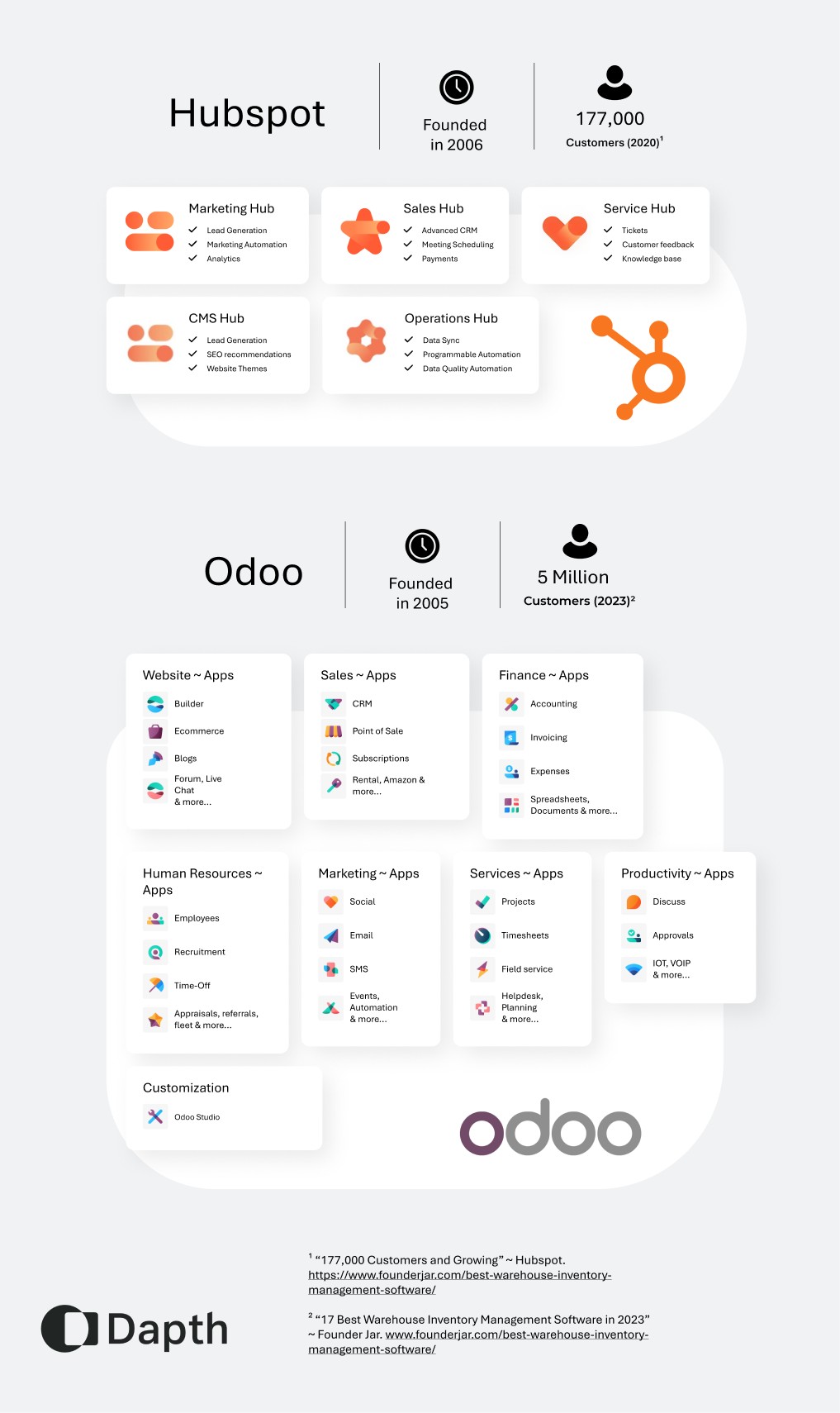
Odoo is a good choice if you’re looking for extensive business management software and the option of customisable applications. However, if you’re looking for an all-in-one marketing, sales, and customer service platform with a specialised focus in these areas, then HubSpot would be a better choice. As an all-in-one software solution designed for companies of all budgets and sizes, Odoo is fully integrated, customisable, and open source; serving most business needs ranging from CRM, sales, and inventory to accounting.
In contrast, HubSpot is more focused on the complete marketing and sales spectrum, covering a vast array of features and capabilities in this area. The HubSpot software can carry out, track, and measure all online marketing activities. It also features the inbound marketing concept, through its own marketing, promoting a message of ‘self-publishing your own way', and can also be used to create landing pages, CTAs to get SEO tips, and as a content management system, enabling users to update website content.
With Odoo, sales teams can easily view leads, statistics, and opportunities, personalise their sales cycle, and automate marketing campaigns to increase sales. Its flow on effect is that it is easier to grow leads and follow up on both calls and meetings; ultimately leading to a more accurate analysis of lead quality and faster decision making. It saves time through integrating emails from contacts directly into the application. With an easily trackable opportunity pipeline, users can see a clear view of next steps to complete, and an automated list of leads from incoming emails. Dubbing itself as the 'world’s easiest to use all-in-one management software', it includes hundreds of business applications from e-Commerce to point of sale, project management and MRP. Its software suite also includes accounting features - a fully integrated accounting system with invoicing, payments, bank reconciliation, and financial reporting options.
Key Differences
Although both platforms share key similarities such as CRM and marketing automation capabilities, sales tools and integrations with third-party applications, key differences lie in a few areas.
Focus and target audience - In terms of focus and/or target audience, HubSpot primarily targets small to mid-sized businesses and focuses on inbound marketing, sales, and customer service whereas Odoo is more ‘all-in-one’ - providing a wide range of applications that are not as focused on CRM and marketing capabilities as HubSpot.
Pricing - In terms of pricing, HubSpot follows a tiered pricing model based on the number of contacts and features needed. However, Odoo has a very modular pricing structure, allowing businesses to select and pay for specific applications required.
Software model - Odoo is open source, so its source code is accessible and customisable by developers. In contrast, HubSpot is a proprietary platform and whilst it does offer some customisation, the underlying source code isn’t accessible to developers for customisation purposes.
Customisation - Whilst Odoo has a strong focus on extensibility and allows developers to create custom modules and modify the platform to fit specific business needs, HubSpot certainly has a more limited level of customisation although offers a wide range of native, third-party integrations. Whilst Odoo aims to provide a comprehensive suite of business applications, HubSpot is much more specialised, with a strong focus on marketing, CRM, and sales, as well as inbound marketing methodologies.
Feature scope - The way that the CRMs are marketed also differs greatly - HubSpot is generally seen and dubbed as marketing software, whereas Odoo is seen as business management software with a much broader scope of features. Each workplace has different needs and they cater to these differences. For example, HubSpot would be perfect for a small digital agency that is time poor and looking to streamline their marketing efforts and improve lead generation. Odoo, on the other hand, would be ideal for manufacturing company due to its comprehensive business management features, such as a dedicated manufacturing module, inventory management and project management features. It really caters to businesses with multiple departments beyond just CRM and marketing.
Whilst both HubSpot and Odoo provide CRM functionality for tracking sales and leads, HubSpot offers a more comprehensive set of features and tools for managing the entire sales process. It includes lead scoring, advanced automation, integration with marketing tools, and robust reporting and analytics. Odoo's CRM module focuses more on lead management and pipeline tracking, with customisation options to fit specific business needs.

What should Australian businesses consider?
Beyond features and pricing, there are a couple of practicalities worth weighing specifically as an Australian business.
If accounting and payroll sit inside your CRM/ERP decision, check how each platform handles Australian requirements before committing. Odoo's accounting and payroll modules are built to handle local obligations like GST reporting and Single Touch Payroll, which matters if you're planning to run finance and HR through the same system as your CRM. HubSpot doesn't attempt this. Its Commerce Hub covers quoting, invoicing and payments, but it isn't an accounting system, so businesses using HubSpot for CRM typically keep a separate tool (commonly Xero or MYOB) for compliance-grade finance and payroll.
Data residency is worth a mention too, particularly for businesses in regulated or government-adjacent sectors. Both vendors offer options for hosting customer data closer to home rather than defaulting to a US-only region, so if that's a compliance requirement for your business, it's worth confirming directly with either vendor at the scoping stage rather than assuming.
Key Feature Comparison
Sales
Odoo’s sales module includes features such as quotations, orders and contracts management, product catalogue measurement, pricing and discount management.
HubSpot has a ‘Sales Hub’ which has sales management tools for managing sales pipelines, automating outreach, and tracking customer interactions. It also offers email tracking, meeting scheduling, and sales analytics to help teams streamline their sales processes.
Marketing
Odoo lets you design an entire workflow for your organisation, and you can set what you want to happen next depending on the customer’s reaction to the email that you sent, whether they’ve replied/deleted the message etc. It allows businesses to create and track marketing campaigns, manage leads, contacts, and analyse marketing performance.
In contrast, the Marketing Hub in HubSpot is very comprehensive. This feature in HubSpot includes tools for creating and managing email campaigns, landing pages, social media posts, and blogs. It also offers SEO optimisation tools, lead generation forms, and analytics to help measure the effectiveness of marketing efforts.
Integrations
HubSpot integrates with a wide range of third-party tools, including Salesforce, Shopify, Zoom, and many others. This allows businesses to streamline their workflows and consolidate their data across multiple platforms.
The beauty of Odoo lies in its open-source nature, an advantage of Odoo being open source is the availability of free apps that may be integrated into it. There are innumerable integrations for Odoo software regardless of the type of business you’re managing.
Reporting and Analytics
HubSpot provides comprehensive reporting and analytics tools to help businesses measure the effectiveness of their marketing, sales, and service efforts. It includes dashboards, reports, and custom metrics to help teams make data-driven decisions.
Odoo doesn’t just offer marketing and sales reporting, but other types of reports - including balance sheets, tax, and bank reconciliation reports. As Odoo is open-source software, users have plenty of apps to choose from for creating dashboards.
User Interface (UI) and ease of use
HubSpot’s UI is extremely user friendly, with a crisp and organised layout complete with easy, intuitive navigation, and its dashboard presents key metrics at a glance. In contrast, Odoo has a fully customisable dashboard that allows users to totally personalise their workspace for the most relevant and up to date information.
Pricing
Regarding pricing, what makes Odoo more appealing to some startups/smaller businesses is its free plan. Odoo Community Edition is free whilst other versions come with a monthly cost. In contrast, HubSpot also has a free plan - although it doesn’t offer the wide range of features that the free Odoo plan does.
Historically, HubSpot's free plan, known as the "Free CRM," provides basic customer relationship management (CRM) functionality, including contact and lead management, email marketing, and a limited number of users and contacts. HubSpot also offers additional paid plans with more advanced features and functionality for marketing, sales, and customer service.
On the other hand, Odoo's free plan, called "Odoo Community Edition," offers a broader range of features beyond just the scope of CRM. It includes modules for CRM, sales, inventory management, accounting, project management, and more. However, it's worth noting that the free version of Odoo may have limitations compared to their paid plans or require additional modules to unlock certain features.

Can HubSpot and Odoo work together?
For businesses that don't cleanly fit one side of this comparison, running both isn't unusual. A common pattern is HubSpot handling marketing and lead generation at the front end, with deals flowing through to Odoo once they close, where operations, fulfilment, invoicing and payroll take over.
Native sync tools exist to connect the two, keeping contacts, companies and deal records aligned between platforms without manual re-entry. It's worth treating this as a genuine third option rather than a compromise: businesses with a real marketing-led acquisition motion and a real operational back end sometimes get more value from two specialised tools talking to each other than from forcing one platform to do a job it wasn't built for.
The trade-off is added complexity. An integration is another moving part to configure, maintain and troubleshoot, so it's worth confirming there's a genuine need for both systems before adding that overhead.
Where does Dapth fit into this decision?
Dapth isn't a HubSpot vendor, so we'll say upfront: if HubSpot is the right call for your business, that implementation sits with HubSpot's own partner network. Where we do come in is on the Odoo side and everything around it.
As a software development company that builds and customises Odoo deployments, we help Australian businesses configure the modules that actually matter to them, connect Odoo to existing systems, and build the custom functionality Odoo's open-source foundation makes possible but doesn't hand you out of the box.
Platform choice is also rarely the whole project. If your transformation includes a customer-facing rebuild alongside it, whether that's mobile app development or a broader web platform, or internal collaboration tools like sharepoint consulting to sit alongside your new CRM or ERP, that surrounding stack needs to work with whichever backend you land on. And whichever platform wins, the interface your staff and customers actually use daily matters just as much as the feature list behind it, which is where our UX & UI Design Services come in.
User Stories
Odoo x Grameen Danone, social enterprise based in Bangladesh
As the business grew, Grameen Danone realised it could no longer rely on its manual operational workflow and inept accounting software that failed to present financial data accurately.
“Our experience with Odoo is excellent. It gives us the flexibility to tackle all the issues in the procedure faster and more accurately. I recommend Odoo to any other organisation looking to be a more agile entity and drive business performance.”
Dipesh Nag, Managing Director at GD
The organisation needed custom reporting and additional business performance analysis via Inventory, Manufacturing and Accounting modules, which has facilitated easy tracking and improved the manufacturing process by streamlining it by almost 50%.
An example of Odoo’s customisation, they implemented a customised mechanism to help automate purchasing prices according to quality and be alerted of business losses, alerting Grameen Danone to spot losses quickly within the production line, and refine its business strategy.
HubSpot x Mr Yum
Mr Yum (now merged into me & u) is a web-based ordering and payments platform. After rapidly expanding their business, they had to evolve beyond disconnected business systems.
“HubSpot’s platform was key to unifying the business data which enhanced agility and better equipped the business to scale.”
Kim Teo, Co-founder and CEO
HubSpot’s platform gives a much needed single source of truth and insight into customer journeys, which is critical when you’re navigating rapid growth. It breaks down internal silos to offer a single view of the customer base and powers all sales, marketing, support and project management activities, making key business information transparent and easily accessible to multiple departments.
HubSpot allowed Mr Yum to consolidate its tech stack of disparate systems into a single unified platform. Previously, data fragmentation hampered reporting which created inefficiencies and barriers to rapid growth.
Frequently asked questions
Can I use HubSpot and Odoo together?
Yes. A common setup runs HubSpot for marketing and sales, with won deals flowing through to Odoo for fulfilment, invoicing and operations. Sync tools exist to keep contact and deal data aligned between the two, though it's worth confirming your business genuinely needs both before adding the integration overhead.
Which is cheaper, HubSpot or Odoo?
It depends on what you're using. Odoo's per-user pricing covers every application on your plan, which tends to work out more cost-effective for businesses using several modules (CRM, accounting, inventory) at once. HubSpot's free and entry-level CRM tiers can be cheaper for a small team that only needs marketing and sales tools, but cost tends to climb as contact volume and feature tiers grow. Get current quotes from both vendors directly, since pricing on both sides changes regularly.
Does Odoo handle Australian GST and payroll requirements?
Odoo's accounting and payroll modules are built to support Australian obligations like GST reporting and Single Touch Payroll, which is a genuine advantage if you want finance and HR running on the same platform as your CRM. HubSpot doesn't offer this natively, so businesses on HubSpot typically pair it with a dedicated Australian accounting platform.
Do I need an implementation partner to set up Odoo, or can I do it myself?
Odoo's Community Edition is genuinely usable to trial on your own. But once you're customising modules, integrating existing systems or configuring anything beyond the defaults, most Australian businesses bring in a partner rather than building it internally, largely because Odoo's flexibility is also what makes a wrong configuration decision expensive to unwind later.
Conclusion
HubSpot and Odoo aren't really rivals so much as answers to two different questions. If your business runs on inbound marketing and a sales pipeline, and your operational systems already live elsewhere, HubSpot is built for exactly that. If you want customer data connected directly to inventory, accounting, manufacturing and HR on a single platform, Odoo is the stronger foundation, and for many growing Australian businesses, the more cost-effective one as the toolset expands.
There's no universally right answer here, only the right one for what your business actually needs to run.
Leaning towards Odoo, or still weighing it against HubSpot for your business? Dapth can help scope which modules you actually need and what a proper implementation looks like.
Talk to Dapth about your Odoo projectAuthor




-Large.jpeg)


_web.webp)
-Large.jpeg)

-Large.jpeg)
-Large.jpeg)
-Large.jpeg)

-Large.jpeg)