
-Large.jpeg)
Choosing an enterprise CMS on features alone is how organisations end up locked in. The CMS Autonomy Matrix evaluates platforms on how much control they actually give your team content, code and cost. Here's the framework, and where the major platforms land.
If you're weighing a platform decision now, this is exactly what Dapth's CMS & DXP consultancy works through with you.
Key takeaways
- Feature comparisons tell you what a platform can do. They don't tell you who has to be involved to do it, or what it costs to keep running for five years. Those two questions decide most of the value.
- Dapth evaluates enterprise CMS platforms on two axes that procurement checklists routinely skip: marketing autonomy (how independently a marketing team can operate) and total cost of ownership (the real five-year cost of running the platform, not the licence line).
- Autonomy does not mean "no developers." It means marketers handle day-to-day publishing, campaigns and personalisation themselves, so developers focus on integration and higher-value engineering.
- Platform lifecycle is a hidden TCO driver. Kentico Xperience 13 reaches End of Support on 31 December 2026; several Sitecore XP releases are already out of mainstream support. An approaching end-of-support date is a cost and risk event, not just a version number.
- The matrix is deliberately opinionated but evidence-led. It reflects Dapth's assessment of typical enterprise deployments. Implementation quality can move any platform a full quadrant.
Why feature comparisons are no longer enough
If you've ever sat through a CMS selection process, you'll recognise the artefact at the centre of it: the feature matrix. A spreadsheet, dozens of rows deep, with a tick or a cross against each platform. Personalisation? Tick. Multilingual? Tick. Headless delivery? Tick. Workflow approvals? Tick.
The problem is that almost every serious enterprise platform now earns a tick on almost every row. Feature parity at the top of the market is real. When every option can technically do the thing, the checklist stops discriminating, and organisations end up choosing on brand familiarity, the loudest sales process, or whatever the incumbent agency already knows.
That's how organisations end up technically satisfied and operationally frustrated: a platform that ticks every box but requires a developer for every landing page, or one that does everything and costs three times what anyone modelled. The tick was accurate. It just didn't tell you what mattered.
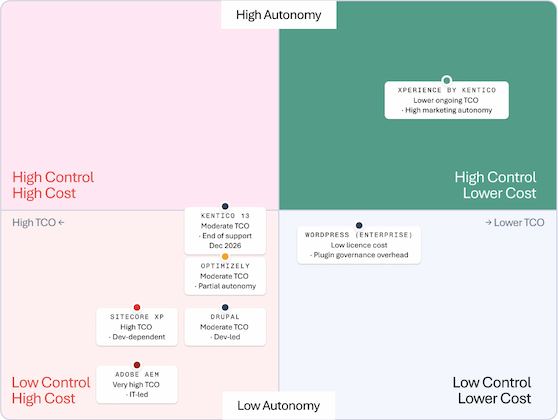
Two questions do most of the discriminating, and neither fits neatly in a checklist. First: who has to be involved to get everyday work done? Second: what does this platform actually cost to own over its life, not to license for year one? Those are the two axes of the CMS Autonomy Matrix.
What is marketing autonomy?
Marketing autonomy is the degree to which a marketing team can perform its day-to-day digital work without a developer in the loop. High autonomy means a marketer can build a landing page, launch a campaign, adjust a personalisation rule, schedule content, manage assets and run an experiment inside the platform's own tools. Low autonomy means those same tasks route back to an engineering backlog and wait their turn.
It's easiest to see across a set of concrete, recurring tasks. For each, ask: can a trained marketer do this alone, or does it need a developer?
- Editing existing content and publishing it
- Creating new pages and landing pages from reusable components
- Building and adjusting personalisation and audience rules
- Assembling campaigns, scheduling, and managing the content workflow and approvals
- Managing digital assets and the media library
- Running A/B tests and experiments
- Editing visually, in context, rather than in an abstract form
- Doing all of the above within governance: permissions, approval chains, brand controls and audit trails
The single most important clarification: autonomy is not the absence of developers.Every enterprise platform needs engineering for integration, custom components, security and architecture. High autonomy simply means developers aren't the bottleneck for routine marketing activity. It changes what developers spend their time on, connecting systems and building capability, rather than resizing images and publishing pages someone else wrote.
Autonomy is also where content modelling quietly matters. A well-modelled platform gives marketers structured, reusable building blocks they can recombine safely. A poorly modelled one gives them a blank canvas that only a developer can populate, or a rigid template that can't flex without a code change. The same platform can deliver high or low autonomy depending on how it was modelled on day one, which is exactly why implementation quality can override platform choice.
What contributes to CMS total cost of ownership?
Total cost of ownership is the full five-year cost of running a platform, and the licence fee is often the smallest part of it. When organisations are surprised by what a CMS "really costs," it's almost always because the model only counted the line item on the contract. A realistic TCO model includes:
- Licensing and subscription - annual platform fees, tiered by traffic, environments, seats or capability.
- Hosting and infrastructure - servers, environments, CDN, scaling. Traditional on-premise stacks carry this directly; SaaS platforms fold it into subscription.
- Development and implementation - the build, plus every subsequent change that needs engineering.
- Maintenance and upgrades - the recurring cost of staying current, and the periodic cost of major version migrations.
- Security - patching, monitoring, and the risk cost of running anything unsupported.
- Integrations - connecting the CMS to CRM, ERP, marketing automation, analytics and commerce.
- Internal capability and training hiring, upskilling, or retaining people who know the platform.
- Developer dependency - the ongoing cost, and the delay, of routing routine work through engineering.
- Vendor lock-in and opportunity cost - how expensive it is to leave, and the value lost to slow execution.
Two of these deserve special attention because they're the ones spreadsheets miss most often.
Upgrade model is a TCO decision, not a technical footnote. There's a structural difference between platforms that update continuously (evergreen SaaS, where you're always on the current version) and platforms that require periodic major-version migrations (traditional on-premise, where every few years you fund a project to move from version N to N+1, carrying forward technical debt each time). The evergreen model spreads cost thinly and predictably. The migration model concentrates it into large, disruptive, occasionally unavoidable projects. Over five years, that difference can dwarf the licence gap.
Platform lifecycle is a cost event with a date on it. When a platform reaches End of Support, the vendor stops shipping fixes and security patches. The software keeps running, but you now own all the risk. This is worth stating precisely, because the terms get used loosely:
| Term | What it actually means |
|---|---|
| End of Support (EOS) | The vendor stops providing updates, security patches and technical assistance for that version. The software still runs, but any newly discovered vulnerability is now your problem to mitigate. |
| End of Life (EOL) | The broader retirement of a product, after which it is no longer available, maintained or recommended at all. |
The distinction matters financially. A platform approaching EOS carries a countdown: a mid-sized migration typically takes months of planning and rebuild, so an EOS date inside 12–18 months is effectively a budget line you've already committed to, whether or not it's in this year's plan.
Understanding the matrix
The matrix plots two axes. The vertical axis is marketing autonomy (high at the top, low at the bottom). The horizontal axis is total cost of ownership, arranged so that lower TCO sits to the right and higher TCO to the left. That produces four quadrants, and the goal is to understand the trade-offs each one represents, not to crown a winner.
| Quadrant | Characteristics & trade-offs |
|---|---|
| High autonomy · lower TCO (top-right) | Marketing-led operation, lower operational overhead, faster campaign execution, lower developer dependency. The most agile position, provided the platform is genuinely capable enough for enterprise needs. |
| High autonomy · higher TCO (top-left) | Strong marketing capability, but that capability comes with enterprise complexity and higher ownership cost. Powerful, but you pay for the power. |
| Low autonomy · lower TCO (bottom-right) | Lower platform cost, but greater reliance on developers or plugins to get work done. Whether that's a good trade depends heavily on organisational maturity and in-house capability. |
| Low autonomy · higher TCO (bottom-left) | High ownership cost and significant developer reliance, which tends to mean slower marketing execution. Often justified by deep enterprise or personalisation requirements that genuinely need it. |
No quadrant is "bad." A platform in the bottom-left can be exactly right for an organisation with a large in-house engineering team and complex, regulated requirements. A platform in the top-right can be wrong for an organisation whose needs genuinely exceed its ceiling. The matrix is a lens for matching a platform to an operating model, not a league table.
Why each platform sits where it does
For each platform below we look at marketing autonomy, the typical implementation and upgrade model, developer dependency, TCO considerations, and where it tends to fit, drawing on vendor documentation, independent research and implementation evidence. Where a conclusion rests on Dapth's consulting experience rather than published data, we say so.
Xperience by Kentico
Xperience by Kentico is Kentico's current platform, and architecturally it's the clearest example of the top-right pattern. It uses a hybrid-headless model (you can deliver content headlessly via API or through built-in presentation), combines that with SaaS-delivered services, and updates continuously rather than through major version migrations. Kentico's own guidance is unambiguous that ongoing development effort is focused here and that the platform receives regular refreshes, meaning there is no equivalent to the periodic "upgrade from 12 to 13" project that defined the older model.
For marketers, that translates to a visual page builder, in-context content authoring, native personalisation and marketing tooling, and governance controls, the ingredients of day-to-day autonomy. Developers remain essential for integration and custom components, but they aren't the bottleneck for routine publishing and campaigns.
On TCO, the evergreen model is the key point: cost is spread thinly and predictably, and the large, disruptive re-platforming project is largely designed out. That combination, marketer-operable and no migration cliff, is why Dapth places it high on autonomy and lower on ownership cost. (Disclosure: Dapth is a Kentico Gold Partner. Placement reflects the architecture and our implementation experience; readers should weight that accordingly.)
Kentico Xperience 13
Kentico Xperience 13 (the predecessor to Xperience by Kentico) is a capable, mature, traditional platform, and it is on a clock. Kentico has published that Xperience 13 receives only security hotfixes through 2026 and reaches End of Support on 31 December 2026; from 1 January 2027 all support, updates and security patches cease, and continued use is at the organisation's sole risk.
This is the EOS-versus-EOL distinction made concrete. The software won't stop working on New Year's Day 2027, but it will stop being patched, which for any organisation handling customer data is a governance problem, not just a technical one. Because it follows the traditional major-version upgrade model, moving off it is a migration project, not a background update, and migrations of this kind commonly run several months for a mid-sized site. An EOS date this close is why the platform's effective TCO is rising even though its licence cost hasn't changed: the migration is a cost that's already been incurred in principle, just not yet in cash.
Optimizely
Optimizely is a genuinely strong platform, particularly for experimentation, where it's an acknowledged leader, and its consolidated "Optimizely One" offering spans CMS, content marketing, experimentation, commerce and personalisation in one workflow. A Forrester Total Economic Impact study commissioned by Optimizely reports substantial ROI for the DXP. That study is vendor-commissioned, so we treat the headline figure as indicative of well-executed potential rather than a neutral benchmark.
So why does Dapth assess its marketing autonomy as moderate/partial rather than high? Because unlocking the platform's strengths, especially experimentation and richer personalisation, typically involves meaningful developer and specialist involvement to implement and maintain, and enterprise implementations tend to be engineering-led rather than marketer-led out of the box. The capability ceiling is high; the everyday self-service floor, in typical deployments, sits below platforms designed marketer-first. That's a statement about the common implementation pattern, not the theoretical maximum, and a strong implementation can raise it.
Sitecore XP
Sitecore Experience Platform (XP) is a powerful enterprise platform with deep personalisation and marketing-automation heritage, and it is also the clearest example of the developer-dependent, high-ownership-cost pattern. It's a traditional on-premise .NET stack: you own the infrastructure, the environments and the upgrade cycle. Personalisation and analytics historically ran through xDB, capability that in the modern Sitecore world is being unbundled into separate composable products (CDP and Personalize).
Lifecycle pressure is real and specific. Sitecore has shifted its investment decisively toward its composable XM Cloud offering; mainstream support for XP release 10.4 runs to 31 December 2027 (extended to 2030), several earlier XP releases are already past mainstream support, and there is no major XP release planned beyond 10.4. On TCO, industry practitioners describe both the on-premise run cost and the eventual re-platform as significant, one UK agency cites a Sitecore 10.4 upgrade at six figures that carries existing technical debt forward and returns the same decision a few years later.High capability, high ownership cost, high developer dependency, hence the placement.
Adobe Experience Manager (AEM)
AEM sits at the top of the enterprise market, and its placement reflects that: exceptional capability, and correspondingly high ownership cost. It's typically deployed as part of the broader Adobe Experience Cloud, which is where much of its value, and its cost, lives. Implementations are commonly IT- and agency-led, with licensing negotiated at enterprise scale and total programmes frequently reaching six and seven figures once infrastructure, integration and specialist skills are included. This assessment reflects typical enterprise deployments Dapth observes in the market rather than a single published figure, precise AEM costs are negotiated and rarely public.
For a large, Adobe-committed enterprise with the internal capability to run it, AEM can be entirely justified. The point of its position on the matrix is not that it's a poor platform, it's that the operating model it implies (IT-owned, specialist-heavy, high fixed cost) is the opposite of marketer-led autonomy, and organisations should choose it with that trade-off explicit.
Drupal
Drupal is the strongest open-source option in the enterprise conversation: no licence fee, exceptional flexibility, and a large module ecosystem that can be assembled into almost anything. That flexibility is precisely why it sits where it does. Realising it is a development exercise, Drupal is a platform for teams with engineering capability, and the everyday marketing experience depends heavily on how well the build abstracted complexity away from editors.
"Free" is a licence statement, not a TCO statement. Drupal's ownership cost shows up in development, hosting, ongoing maintenance, module governance and the security discipline of keeping a module estate patched. For an organisation with in-house Drupal skills, the trade can be excellent value; for one without, the developer dependency and maintenance burden push effective TCO up and autonomy down. Dapth places it as moderate TCO, developer-led, reflecting typical Australian enterprise deployments.
WordPress (Enterprise)
This assessment is about enterprise WordPress, not small brochure sites. At enterprise scale, WordPress offers a low licence cost and a mature editing experience: the Gutenberg block editor gives marketers genuine page-building autonomy, which is a real strength. The complication is the operating model that delivers enterprise capability, the plugin ecosystem.
Almost every non-trivial WordPress capability, from forms to SEO to caching to security, is delivered by third-party plugins, and plugin reliance is where enterprise WordPress accumulates hidden cost and risk. The security data is stark: Patchstack's 2024 analysis found that of nearly 8,000 new WordPress-ecosystem vulnerabilities that year, roughly 96% were in plugins, with only a handful in core, and a large share exploitable without authentication. Each plugin is a dependency you don't control, on a patching cadence you don't set. At enterprise scale, managing that plugin estate, auditing, updating, testing for conflicts, governing what gets installed, becomes a real and recurring operational load. That's why the placement pairs low licence cost with a caution: the sticker price is low, but plugin governance is the line item that grows.
Common objections and misconceptions
"Isn't 'autonomy' just a page builder?" No. A page builder is necessary but not sufficient. Autonomy is the full set, personalisation, experimentation, workflow, asset management and governance, operable by marketers. Plenty of platforms have a page builder and still route most real work through developers.
"High autonomy means we don't need developers." Also no, and it's the most important misconception to retire. Every enterprise platform needs strong engineering. Autonomy just moves developers off the marketing critical path and onto integration and architecture, where their time is worth far more.
"Open source is free, so it must be lowest TCO." Zero licence cost is not zero total cost. Development, hosting, maintenance and security governance are where open-source TCO lives, and for teams without in-house capability, they can exceed a commercial subscription.
"Our platform is enterprise-grade, so lifecycle isn't our concern." Lifecycle is a cost event with a date. An approaching End of Support turns a stable platform into a migration project and a security liability, on a fixed timeline, regardless of how capable it is.
How organisations should actually evaluate a CMS
Start before the feature matrix, not with it. In practice, a more useful evaluation runs roughly like this:
- Define the operating model first. How much does marketing need to do independently, and how much engineering capability do you genuinely have in-house? That single answer reshapes the whole shortlist.
- Model five-year TCO, not year-one licence. Include hosting, implementation, maintenance, the upgrade or migration model, security, integrations and internal capability. Ask specifically how the platform updates, and what a major version change costs.
- Check the lifecycle clock. Find the End of Support date for any version you'd deploy, and build it into budget planning from day one.
- Weight autonomy deliberately. For every routine marketing task, ask whether it needs a developer. The answers predict your execution speed for years.
- Then, and only then, use the feature matrix, to confirm the shortlist can do what you need, not to choose between platforms that can all already do it.
- Remember implementation quality dominates. A well-modelled deployment of a "lower autonomy" platform can outperform a poorly modelled deployment of a "higher autonomy" one. The platform sets the ceiling; the build determines how much of it you reach.
Final thoughts
The feature checklist isn't wrong, it's just answering a question that no longer discriminates. When every serious platform can do almost everything, the decisions that actually shape value are about operating model and ownership cost: who has to be involved to get work done, and what it truly costs to keep the platform running well for five years.
That's what the CMS Autonomy Matrix is built to surface. It won't make the decision for you, and it isn't meant to. It's meant to make the trade-offs visible, so an enterprise architect, a digital leader and a marketer can look at the same picture and have a more honest conversation than a spreadsheet of ticks allows. If you're weighing a platform decision or a migration and want an independent read on where you'd land, that's the kind of question our digital consultancy practice exists to work through.
Sources
- Kentico, Product Support Lifecycle Kentico Xperience 13 (End of Support 31 December 2026; security hotfixes only through 2026; all support ceases 1 January 2027). kentico.com
- Fishtank, What's New in Sitecore 10.4 & the Future of Sitecore (XP 10.4 mainstream support to 31 December 2027, extended support to 2030; XM Cloud is the strategic direction). getfishtank.com
- Forrester Consulting / Optimizely, The Total Economic Impact of Optimizely One, 2025 a study commissioned by Optimizely (vendor-commissioned; cited as indicative). optimizely.com
- Patchstack, State of WordPress Security in 2024 (~7,966 new ecosystem vulnerabilities; ~96% in plugins; large share exploitable without authentication). patchstack.com
- Mando Group, If you're still on Sitecore, now is the time to ask hard questions (practitioner view on XP run cost and upgrade economics). mandogroup.com
Author


_web.webp)
-Large.jpeg)

-Large.jpeg)

-Large.jpeg)

-Large.jpeg)

-Large.jpeg)
_web.webp)
-Large.webp)
-Large.jpeg)